






If you’re seeking a n8n alternative, go with Lindy for building flexible AI agents without coding, Node-RED for crafting conditional responses, and Huginn if you’re a developer familiar with GitHub.
Read on to learn more about:
- What n8n is and how to find an n8n alternative
- Key features of n8n alternatives
- Our top 10 n8n alternatives, what they do better than n8n, pricing, and users
- How Lindy differs from n8n
Let’s now briefly cover what n8n is.
What is n8n?
n8n is a low-code workflow automation platform that connects applications, services, and APIs, so you can automate complex tasks without having a programming degree. The drag-and-drop interface lets you create detailed workflows — you can add various triggers to start the workflow, then string together operations across apps.
The platform offers integrations with over 400 platforms, facilitating data transfers between them. Because it’s open-source, developers and techies can modify n8n’s core code to suit their needs better, run it on their own servers (on-prem), and optimize it with other programmers.
Why look for an n8n alternative?
While n8n is an excellent open-source automation tool for developers, it’s not for everyone. Here are some reasons why folks might seek out other options:
- Steep learning curve: While n8n is a powerful tool with extensive capabilities, it’s complex and takes some time to learn, especially when configuring nodes to create workflows. If you want to leverage n8n’s open-sourced capabilities fully, you’ll need to have some experience with coding.
- Sluggish setup time: To entirely create and deploy your n8n workflows, you’ll need to leverage networking methods, API integrations, and open-source tools like Docker. Even if you’re a techie, working with several tools in tandem can cause challenges.
- Security risks: Being open-sourced allows techies to configure n8n’s source code to meet their needs, but this comes at a cost. The code's openness allows hackers and other malicious actors to breach your data, infect your operating system, or worse.
- Performance overhead: Because n8n is a self-hosted, open-source platform, it often requires significant backend resources to operate it at scale. And if you don’t have the right tools configured, you may experience slow execution times or delays in your job queue. Unlike cloud-native platforms that handle scaling and updates automatically, n8n requires you to manually monitor performance, manage server loads, and troubleshoot errors related to resources.
- Limited AI functionality: n8n can connect to external AI services like OpenAI via API, but not with a few simple clicks. Accessing AI features requires a technical setup and knowledge of scripting. This means that if you want to summarize a document, analyze sentiment, or build an AI chatbot, you’ll need to manually connect to OpenAI or another LLM provider by patching code to an API — not a beginner-friendly task.
- User experience (UX) complexity for non-techies: n8n’s interface is designed with developers in mind. Visual workflows require an understanding of logic, nodes, and scripting parameters, which aren’t beginner-friendly. The bottom line: You’ll need to be familiar with programming to use n8n.
How we chose our n8n alternatives
When seeking out n8n alternatives, we looked for automation platforms that outperformed n8n in the following areas:
- No-code development: We found platforms with proper no-code development tools, where even non-technical users can create powerful automations using drag-and-drop interfaces and pre-configured components like workflow templates. The best alternatives allow users to build, test, and deploy workflows without writing a single line of code.
- Community support: We looked for platforms backed by responsive, knowledgeable communities and official support teams. This includes an active forum, documentation, tutorials, and real-time assistance options like live chat or premium onboarding support.
- Native AI integrations: We prioritized alternatives that offer plug-and-play AI capabilities, such as natural language triggers, document summarization, data enrichment, and even chatbot creation, built directly into the platform. Some of these platforms even allow you to choose from multiple AI platforms, like several versions of ChatGPT-4, Claude, and Gemini.
- Cost-efficient: We looked for platforms that offer transparent pricing, generous free tiers, and predictable monthly plans, which don’t require a full DevOps team to manage. The best alternatives offer strong automation capabilities with minimal setup and lower operational overhead, and allow for the purchase of additional monthly automations.
The 10 best n8n alternatives: TL;DR
Before covering the details of each top n8n alternative, here is a table summarizing the key details for each n8n alternative:
#1 Lindy: The best overall automation tool

Lindy is a no-code AI automation platform that lets you create task-specific agents, called Lindies, through a drag-and-drop interface. Unlike n8n’s more developer-friendly approach, we offer a programming-free solution that’s better for beginners. This means anyone can create AI automations to organize their email, schedule meetings, handle sales funnel tasks, and provide customer service support.
What it does better than n8n
- No technical skills required: n8n is a low-code, open-source automation tool, so if you can’t program, using n8n will be nearly impossible. This makes Lindy a great alternative for non-techies — it features a seamless, code-free user experience.
- Faster workflow automation deployment time: n8n requires you to configure APIs and type in a few lines of code to deploy your workflow automations. But Lindy’s simple premade templates make it possible to put together and deploy workflow automations, like for web research or attachment handling, in just seconds.
- Enterprise-grade security and compliance: Lindy is SOC 2 and HIPAA-compliant out of the box, so you can build automations that hold sensitive data. However, cloud-based n8n isn’t HIPAA or SOC 2 compliant, unless you self-host. This requires setup costs, maintenance fees, IT expertise, and, of course, taking the steps to be HIPAA and SOC 2 compliant individually.
- All templates are 100% free: While n8n offers nearly 2,000 automation templates, the community-built or premium add-ons may be behind a paywall, with prices ranging from $5 to above $39. However, you won’t need to worry about paying extra for a template when you go with Lindy.
Ideal users
Lindy works for non-technical teams that want to create their own AI automations without writing code. Sales, customer support, and recruiting professionals are just a few who can benefit from Lindy. But these professions are just the tip of the iceberg — folks in many other roles will appreciate Lindy’s “no-programming needed” approach.
Pricing
Start using Lindy for free and handle up to 400 monthly tasks. Lindy’s Pro plan, which can execute up to 5,000 automated tasks per month, starts at $49.99 per month.
The bottom line
Lindy is an excellent solution for companies of all sizes aiming to free up time by offloading tasks to AI. With its no-code simplicity, versatile prebuilt AI agents, and built-in security features, you’ll find a reliable way to automate workflows while maintaining user oversight.
#2 Node-RED: A free option for techies

Node-RED is an open-source flow-based development tool that allows you to visually program event-driven applications — it’s built on Node.js and was originally developed by IBM’s Emerging Technology Services team.
What it does better than n8n
- Use the intuitive drag-and-drop interface to create and deploy workflows, which is unlike n8n’s complex interface. This reduces the need for complex coding, enabling you to build powerful integrations, automation routines, and real-time data flows rapidly.
- Node-RED boasts an extensive library of pre-built nodes for everything from IoT device management to complex API orchestrations. These help integrate popular services like MQTT and HTTP or connect to hardware devices such as Raspberry Pi and Arduino boards. n8n lacks these capabilities due to limited hardware interface support.
Ideal users
While the platform features a simple drag-and-drop interface, it primarily appeals to developers with coding experience — especially JavaScript programmers. The tool can create automations for all kinds of businesses, from scrappy startups to established enterprises.
Pricing
Node-RED is an open-source tool under the OpenJS Foundation, so it’s free for personal or commercial use. You’ll only pay for hosting and services beyond the base offering.
The bottom line
While Node-RED is a powerful and free automation tool, non-techies will struggle with it.
#3 Huginn: Great for developers who love GitHub

Huginn is an open-source system for building agents that automate tasks on your behalf — think of it as your own personal version of IFTTT or Zapier, but self-hosted and more customizable.
What it does better than n8n
- While n8n lacks built-in tools for complex event detection, Huginn allows you to create AI tools that detect events from diverse sources such as RSS feeds, APIs, or scraped web content. These tools filter and act upon that data to automate tasks like automatically sending email alerts or storing insights in databases.
Ideal users
Huginn is ideal for tech-savvy folks who are familiar with GitHub working in organizations of all sizes. And developers familiar with Ruby on Rails will find the platform extra inviting, as this is the coding language used to develop Huginn.
Pricing
While Huginn is free to use and distribute under the MIT License, you must cover your own hosting, whether on-prem or through a cloud provider, and any associated infrastructure expenses.
The bottom line
While Huginn delivers a powerful automation platform that is highly customizable and grounded in a thriving open-source community, it’s pretty much limited to developers, especially those familiar with Ruby on Rails.
#4 Directus: For intelligent content management

Directus is a versatile open-source data platform for handling and managing all sorts of content. Its user-friendly interface and robust API layer allow you to connect any SQL database to a strong and intuitive CMS (content management system).
What it does better than n8n
- One of Directus’s standout features is its ability to transform any SQL database into a REST API, giving you immediate access to content without requiring repetitive backend code. n8n lacks native database schema introspection and requires manual configuration for API exposure and updates.
- Directus provides a polished and intuitive user interface that streamlines data management and collaboration, all in real time. This allows everyone on your team to work together without stepping on each other’s toes. On the other hand, n8n’s interface is geared more toward solo developers and lacks robust multi-user support or streamlined data editing workflows.
Ideal users
Directus appeals to individual developers, small startups, and larger agencies and enterprises that need a flexible, headless CMS for complex data sets. It blends a code-first approach with an approachable user interface, ensuring tech-savvy teams can quickly customize their data environment while less technical users can manage content effortlessly.
Pricing
Start using Directus for $15/month, which provides up to 5,000 database entries and 50,000 API requests. The $99/month version is a solid platform for techies and non-techies, as it allows for up to 5 seats, with 75,000 database entries and 250,000 API requests.
The bottom line
While Directus is an excellent tool for combining and managing enormous amounts of data, you’ll need a few tech-savvy team members, preferably with SQL and API experience, to fully leverage its benefits.
#5 Zapier: For non-technical users

Zapier is a no-code automation platform that connects apps and services to streamline workflows. It allows you to trigger specific functions, like sending a group SMS message once a chart has been updated.
What it does better than n8n
- One of Zapier’s most substantial assets is its extensive app integration ecosystem, which allows users to connect over 7,000 different applications to automate workflows and doesn’t require technical setup like n8n.
- Zapier features a simple, user-friendly editor that allows even the staunchest technophobes to automate processes. This simplifies workflow creation, allowing you to complete tasks quickly and without writing code, which is unlike n8n.
Ideal users
Zapier is ideal for businesses of all sizes that rely on multiple SaaS applications and need a simple, technical-free way to connect them, transfer data, or execute tasks.
Pricing
Zapier pricing depends on how many tasks you automate per month. Plans start at $19.99/month, letting you automate up to 750 multi-step tasks.
The bottom line
While Zapier integrates with 1,000s of third-party apps, executing a high volume of monthly workflows can quickly get costly.
#6 Gumloop: For simple workflows

Gumloop is a no-code automation platform that lets you create AI-driven workflows, streamline complex tasks, or integrate applications through an intuitive drag-and-drop interface.
What it does better than n8n
- Gumloop’s drag-and-drop interface makes building complex automation sequences intuitive and beginner-friendly, using modular nodes — while n8n, though visual, often demands more technical setup and scripting knowledge.
- The platform offers a set of native integrations with popular platforms like Slack, Salesforce, Google, and more. You can connect with these apps and automate tasks, like setting up a workflow that triggers an alert in Slack when a new record is added in Airtable. n8n’s integration support can be less polished and requires additional configuration for integrations.
Ideal users
Gumloop is well-suited for non-technical teams of all sizes, especially those involved in marketing, sales, and customer service. You can use it to set up triggers between apps once tasks have been executed to alert other team members.
Pricing
Start using Gumloop for $97/month and run up to 5 different workflows simultaneously. If you have a team, try the plan for $297/month, which lets you run the same number of simultaneous workflows but allows up to 10 different users.
The bottom line
Gumloop is a superb option to create triggers and automations between tools for non-technical users, yet its pricing structure might be an issue for businesses on a budget.
#7 Make: For precise data management

Make is a visual automation platform designed to help streamline workflows by building complex automation sequences called scenarios.
What it does better than n8n
- While n8n’s data handling often requires custom scripting, one of Make’s key advantages is its strong data manipulation capabilities. These let you transform, filter, and enrich data as it flows between applications, enabling you to narrow down the precise information you need while reducing chaff.
- With built-in functions, aggregators, and formula-based transformations, Make supports dynamic adjustments on the fly — unlike n8n, which primarily relies on basic field mappings and writing JavaScript commands.
Ideal users
Make is ideal for businesses of all sizes that need an automation platform that goes beyond data automations and don’t mind the steeper learning curve than tools like Lindy.
Pricing
Make is priced by operations, or actions that each workflow or automation executes, which starts at $10.59/month for up to 10,000 ops.
The bottom line
Make is a great choice for teams that require granular data harvesting and involved automations. While it is indeed a no-code tool, Make comes with a learning curve, which can take some time to overcome.
#8 Latenode: For ultra-customizable low-code automation

Latenode is a low-code automation platform that combines simple no-code tools with technical elements. It enables the creation of highly customized workflows by connecting various APIs, apps, and databases.
What it does better than n8n
- Latenode offers all the perks of a no-code tool, like a drag-and-drop editor and premade templates, but it also gives you more control over your API calls and data processing. These are typical low-code functionalities. n8n, while flexible, relies heavily on a developer-centric setup with coding.
- The platform also provides a handy AI copilot, which can help you create code, improve automations, and suggest other workflow enhancements. On the other hand, n8n doesn’t currently offer these capabilities without third-party integrations or external tooling.
Ideal users
Latenode works for all types of businesses and professions — IT teams, analytics, sales reps and more — to utilize Latenode to custom-automate many day-to-day tasks.
Pricing
For $8/month, you’ll be able to run up to 2,000 scenarios and leverage some of Latenode’s AI features.
The bottom line
Latenode offers enough power to custom-make complex automations for your specific use cases, but this all comes at a cost — you’ll need to have a little bit of technical knowledge and JavaScript experience to fully understand the platform.
#9 Pipedream: For developers

Pipedream is a low-code/pro-code hybrid platform, while most n8n alternatives are low-code/no-code hybrid platforms. You’ll be able to connect premade databases and APIs to custom-made JavaScript, Python, Go, or Bash code commands.
What it does better than n8n
- With built-in logging, debugging tools, and real-time execution previews, Pipedream streamlines pre-deployment testing. Yet, n8n provides more limited in-editor diagnostics, making it harder to troubleshoot complex automations.
Ideal users
Because it relies so heavily on coding languages, you’ll need to be fluent in a few programming languages to use Pipedream.
Pricing
Pipedream pricing starts at $45 per month and allows up to 5 different accounts, letting you run up to 10 workflows at a time.
The bottom line
Pipedream is a powerful automation platform that blends serverless execution, API integrations, and real-time event processing into a single workflow engine — but if you aren’t a programmer, you won’t be able to use it.
#10 Airbyte: For automating data pipelines

Airbyte is an open-source data integration platform that enables businesses to move and synchronize data between various sources and destinations without writing extensive custom scripts.
What it does better than n8n
- Airbyte features a mammoth library of 300+ pre-built connectors for databases, SaaS applications, and cloud storage platforms. These allow for data extraction and loading across diverse environments, letting you consolidate disparate data sources.
n8n offers fewer native connectors and often requires manual setup or custom scripting to bridge data silos.
- You’ll also get incremental data synchronization, which optimizes pipeline performance by transferring only new or updated records instead of complete datasets. This is unlike n8n, which lacks built-in support for delta updates, resulting in higher bandwidth usage, longer runtimes, and increased storage overhead.
Ideal users
Airbyte is ideal for data engineers, analysts, and IT departments needing automated data integration without complex setup requirements. Any business, from startup to enterprise, dealing with multiple data sources can leverage Airbyte’s extensive connector library and incremental sync capabilities to centralize data.
Pricing
Airbyte doesn’t publish its pricing, so you’ll have to contact its sales department for more info.
The bottom line
Airbyte is a powerful, flexible data integration platform that caters to a broad range of business and technical users. You’ll need to be a techie or have a few on your team if you want to use its extensive library of connectors, incremental sync capabilities, and self-hosted or managed deployment options.
{{cta}}
Lindy vs. n8n: Key differences
Lindy is a n8n alternative geared toward people who want to create automated AI workflows on the fly, without coding. Here are the main differences:
- Lindy requires zero development skills: It’s a true no-code platform accessible to anyone who can create a social media account. You’ll be able to make a workflow in minutes using a premade template, and configure it to your customized needs using Lindy’s drag-and-drop workflow builder. Unlike n8n, which is geared toward developers, you won’t need to write any JavaScript or tinker with APIs.
- Lindy natively connects to several large-language models (LLMs): n8n only connects to LLMs via customized scripts that you need to program. Yet, Lindy natively connects to several models of Gemini Flash, ChatGPT-4, and Claude with just a few clicks. This means you can pick the LLM you want to use for your automations. For instance, select a “smarter” LLM like ChatGPT-4 for a customer service chatbot, but use something lighter, like Gemini Flash 2.0, for simple web research.
Ultimately, nearly anyone can use Lindy to build AI agents that can help execute everything from simple day-to-day tasks, such as inbox organization, to more complex workflows like lead generation, outreach, enrichment, and meeting scheduling. n8n, on the other hand, is for creating custom automations using code, and it’s intended for developers only.
Lindy: Our favorite n8n alternative
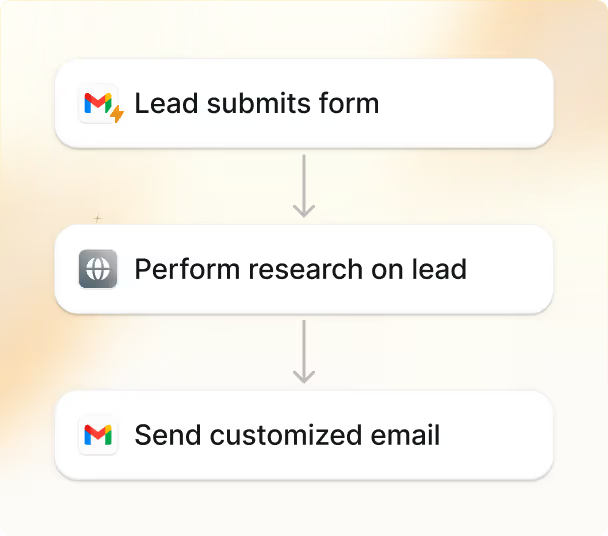
Unlike n8n, which has a steep learning curve, Lindy uses AI-driven automation to simplify complex tasks — and you won’t need to be a developer to use it. Here are just a few more features of Lindy:
- On the clock 24/7: Lindy’s got your back all day, and all night, and can answer customer queries no matter the time zone.
- Simple chatbot embedding: Add a Lindy customer-service chatbot on your website by pasting a code snippet, and let Lindy engage your visitors, clients, and customers. Lindy AI chatbots can also detect when a situation becomes complex and hand off cases to human agents.
- Loads of integrations: By partnering with Pipedream, Lindy integrates with over 2,500 third-party applications, providing more than 5,000 actions. This means you can bring your Lindies to the third-party software you're currently using.
Ready to create helpful AI agents without code? Try Lindy today for free.



.png)
.png)
.png)
.png)
.png)
.png)


