


.png)




Call centers are no longer just rows of agents answering phones — they’re growing into more intelligent automated hubs. This shift shows how artificial intelligence is transforming contact centers: Businesses can now handle higher call volumes, personalize conversations at scale, and resolve issues faster than ever.
From easy-to-train chatbots to solid sentiment analysis, AI is quietly improving each layer of customer service. With so much happening in this industry, I decided to break down how AI will influence call centers — both now and in the future.
I’ll talk about what you need to know to stay competitive and, most importantly, share some of the best AI call center tools that can help you stay on the edge.
In this article, we’ll cover:
- What AI means in the context of contact centers
- Difference between outbound and inbound use cases
- How tools like Lindy are transforming the space
- Trends shaping the future of AI call centers
What is artificial intelligence in a call center?
Artificial intelligence (AI) goes beyond basic scripts and chatbots in a call center. Unlike simple automated responses, AI can help you understand and react to customer needs in a human tone. This technology uses Natural Language Processing (NLP), Large Language Models (LLMs), and speech recognition to better understand and respond to human speech.
Why is this important now? Customers today want fast, personalized service every time they reach out. Plus, with ongoing staffing challenges, call centers are under pressure to perform better with fewer resources. AI can speed up support and boost quality, so your human employees can address complex or sensitive issues that AI is still not able to handle.
Outbound vs inbound AI call center use cases
In call centers, AI is used differently depending on whether the focus is on outbound or inbound communication.
Outbound AI calls are all about reaching out to customers. It automates and optimizes tasks like making calls, scheduling follow-ups, and qualifying leads, which helps actively pursue customer engagement and sales.
On the flipside, inbound AI calls are used to manage incoming communications. It streamlines the process by handling initial inquiries through virtual assistants, offering real-time support to agents, and smartly routing calls to the right person.
AI for outbound
- Lead Qualification: AI sorts through leads to find the most likely to respond, making the process faster and more successful.
- Follow-ups and Outbound Sequences: AI automates follow-up calls and emails, keeping in touch with potential customers at just the right times.
- Call Scheduling and Voicemail Drops: AI can set up calls when customers are most likely to answer and leave voicemails automatically.
- Real-Time Coaching and Analytics: AI tools can provide agents with instant tips and feedback during calls, which can help them improve their performance.
AI for inbound
- Virtual Assistants: AI virtual assistants take care of common questions quickly and efficiently, letting human agents focus on trickier issues.
- First-Touch Deflection: AI can solve simple problems immediately, reducing the need for further help.
- Real-Time Agent Support: AI offers agents tips and information while they talk to customers, making it easier to solve issues.
- Intelligent Routing and Summarization: AI systems like Lindy figure out what a call is about and send it to the best agent, giving a quick summary to speed things up.
Core technologies behind contact center AI

Contact centers use AI technologies, making handling calls easier and improving customer service. Here are the key technologies they use:
- Automatic Speech Recognition (ASR): This tech turns what people say into text, so the system can understand spoken requests clearly and respond immediately. It’s often the first step in a larger Natural Language Processing (NLP) pipeline that enables full voice-based automation.
- Natural Language Understanding (NLU): NLU understands what words mean and what customers want. It's smart enough to handle complex questions and requests.
- Large Language Models (LLMs) and Generative Models: These tools use extensive data to figure out the best things to say in response. They make the AI sound more like a human by giving answers that fit the conversation.
- Sentiment Analysis: This is how AI figures out how customers are feeling, whether they're frustrated, happy, or somewhere in between. It uses this info to respond to match the customer's mood.
- Voice Cloning and Text-to-Speech (TTS): These technologies let the AI talk back in a real voice. They can mimic a human voice so well that conversations feel more natural.
Key features to look for in AI call center tools
If you're choosing an AI tool for your call center, here are a few features that do make a difference:
- Multilingual support: Tools like Lindy can understand and respond in multiple languages, helping you support a wider audience without needing a separate team for each language.
- Context retention: The best AI tools don't treat every message as the first. They remember past conversations, so customers don't have to repeat themselves. This ensures human-like interactions.
- Emotion or sentiment detection: A customer's tone says a lot. AI that can sense frustration, confusion, or satisfaction can respond more appropriately or alert a human agent when it's time to step in.
- Live transcriptions: Real-time transcriptions help agents follow along during calls, take better notes, and save time on post-call summaries. It also helps managers review calls quickly when needed.
- CRM and ticketing integrations: A good AI tool should connect with your existing tools, like your CRM or help desk. That way, it can automatically log conversations, create tickets, or pull up customer info without the agent having to click around.
Challenges of using AI in the call center
AI in call centers sounds futuristic and awesome, right? Well, it is, but it's not without friction. After testing a bunch of these tools, I’ve run into a few recurring challenges that are worth pointing out:
1. Misunderstandings and hallucinations
Even the best AI models occasionally get things wrong. I’ve seen AI assistants misunderstand customer intent, misquote internal policies, or worse — invent answers altogether. This usually happens when the training data is too shallow, or the system doesn’t have access to current company knowledge.
And while it’s rare with top-tier models, one false reply can be enough to frustrate a customer or escalate a ticket unnecessarily.
2. Integration with existing systems
Plugging an AI tool into a call center isn’t always smooth. Many legacy CRMs or ticketing systems don’t play nicely with modern APIs. I’ve had to create custom bridges just to get AI assistants to pull in the right customer data or update records after a call. If your tech stack is outdated or overly siloed, expect some engineering lift before things run smoothly.
3. Agent pushback
Let’s be real. Not every agent loves the idea of AI "shadowing" them. Some worry about job replacement, others feel micromanaged, and many just don’t trust the tool yet. I’ve found that AI works best when framed as a support layer (not a replacement), and when agents are involved early in training the assistant. Otherwise, adoption gets blocked by fear or friction.
4. Legal and compliance risk
When AI tools summarize conversations, auto-generate replies, or handle sensitive customer data, the legal implications stack up quickly. You need to know where the data’s going, how it’s stored, and whether it meets industry-specific regulations like HIPAA or GDPR. Even a harmless automation can create compliance headaches in regulated industries if not properly audited.
Top 8 AI call center tools in 2025
1. Lindy: Best for flexible, AI-powered contact center automation
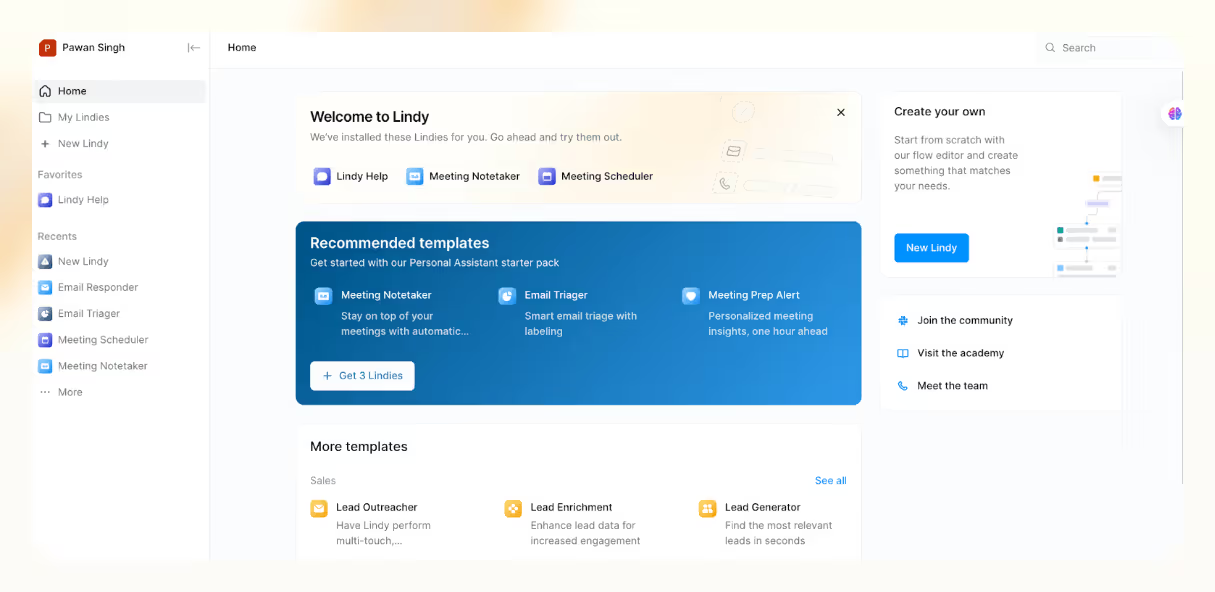
At Lindy, we believe AI call centers shouldn't make calls that sound like robots — they should sound like someone on the team. That’s why you get AI phone agents (we call them Lindies) that can hold conversations, look through unstructured data like your FAQs, and answer questions accurately. They can also remember context across sessions, personalize every reply, and route conversations to a human based on intent, emotion, or urgency.
In addition, Lindy acts like a teammate, not just a phone call software. This means it can handle related tasks after the call, like sending follow-up emails or updating the CRM.
A core feature of our system is the Agent Swarms: Here, an AI agent splits tasks, shares memory, and complete goals concurrently. This is made possible by the Looping feature, which lets your agent process high-volume tasks quickly.
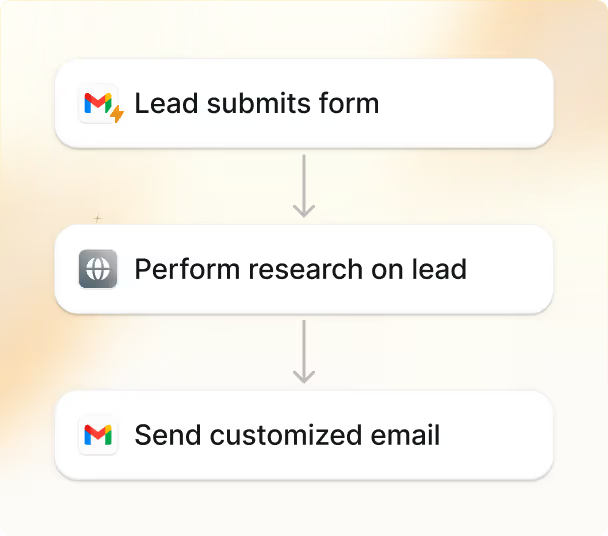
For example, let's say a prospect books a demo call. Now, Lindy researches the lead, handles the call (or preps a call script tailored to the industry), and even follows up with a personalized summary email — all without human input. It's parallel processing, but for customer experience (CX).
These Lindy agents also work across voice and chat, handling inbound calls and outbound campaigns in real time. They adapt mid-call, hand off to live agents when needed, and retain short- and long-term memory to personalize every touchpoint.
You also don’t need to connect integrations from scratch. Lindy connects with 2,500+ apps via Pipedream and supports 4000+ web scrapers through Apify.
On top of that, it integrates natively with popular business tools like Salesforce and Google Sheets. So your Lindies can update records, file tickets, or fetch order data from external portals without breaking a sweat.
Depending on your needs, you can assign specific AI models like GPT-4, Gemini 1.5 Pro, or Claude Haiku 3.5 to different jobs. All this happens inside a no-code interface built for operations teams. You can set up multi-step call flows, schedule follow-ups, or configure handoffs to human agents with a few clicks.

Whether you're handling customer support or outbound sales, Lindy agents make work across sales, CX, and support feel effortless.
Features
- Live chat and phone support with smart routing
- Built-in templates for call handling, meetings, and emails
- Lindy Academy for quick setup and step-by-step tutorials
- Conditional workflows to route leads based on CRM fields
- Calendar and scheduling automations with custom logic
- Guardrails and job-based LLM assignments
- Real-time HR insights for smarter hiring and retention decisions
Pricing
Lindy's free plan gives you 400 credits/month, supports up to 400 tasks, and includes a 1M character knowledge base. It's a great way to test AI call workflows and explore core features without paying upfront. Even the paid plans are scalable:
- Pro (Starting from $49.99/month): 5,000 credits, supports up to 5,000 tasks/month, and a 20M character knowledge base.
- Business (Starting from $299.99/month): 30,000 credits, up to 30,000 tasks/month, premium phone features and priority support.
Ideal For
Lindy is perfect for fast-moving sales, support, and CX teams who want a smarter way to manage calls, follow-ups, and high-volume workflows. It's especially useful for teams in email-heavy industries, HR and recruiting, customer support, or those juggling meetings, tasks, and multiple CRM platforms.
Verdict
Lindy is designed to work like the teammate you wish you had. It understands context, breaks down tasks, loops in the right agents (or people), and follows through. If your current workflow still needs constant tweaks, it's about time you try Lindy.
From inbound call handling to outbound follow-ups, from syncing calendars to summarizing meetings, Lindy takes care of the work that usually falls through the cracks.
{{templates}}
2. Dialpad: Best for real-time AI coaching on voice calls
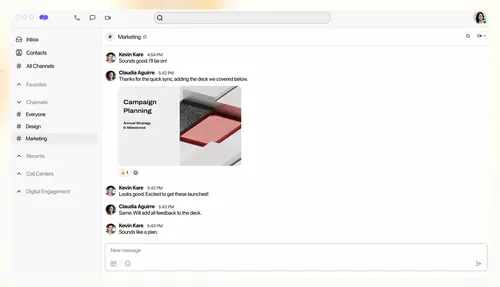
The AI Contact Center (Dialpad Support) is for teams handling both inbound and outbound calls. Using features like real-time transcription, sentiment detection, and auto-summaries is a cakewalk — I didn't have to set up a thing. When I connected it to my CRM, everything synced within minutes.
Even after onboarding, Dialpad's support team stayed in touch and helped me figure things out when I got stuck. I tried reaching out through phone, chat, and emai l— just to see how responsive they were — and every time, someone got back to me within minutes.
I could build custom scripts, set up talking points, and get real-time guidance during calls with AI Playbooks. Real-Time Assist cards surface reminders and prompts while you're on a live call, so reps aren't stuck flipping between tabs or notes. You also get adherence scores and leaderboards to see who's following the script and where someone might need extra help.
Dialpad AI acts like a speech coach, flagging filler words and pacing issues in real time. The 24/7 agent assist came in handy after hours, handling basic queries or flagging urgent ones for follow-up.

Since Dialpad promises no-code workflows, I wanted to see if I could build something more advanced, like a multi-step call routing flow, without an IT team. When I asked for guidance, the support agent didn't just drop a help doc link; they walked me through the setup step by step.
On the downside, some basics like Real-Time Assist (RTA), Digital Virtual Agent, Digital Channels, and AI Scorecards are available as add-ons for the Essentials Plan. Even integrations with tools like HubSpot and Salesforce work best on the higher-tier plans.
Features
- Dedicated apps for Mac, iOS, Windows, and Android
- Chrome Extension to make phone calls and send messages from the browser
- Contact center analytics to optimize agent performance
- Dialpad University with a library of free courses and tutorials
- Integrations with leading SSO providers (Okta, OneLogin)
- AI-generated summary of voice calls for quick references
Pricing
Dialpad has different pricing categories, like Dialpad Connect, Dialpad Meetings, and Dialpad Sell. Likewise, Dialpad Support (AI Contact Center) has three pricing tiers:
- Essentials ($95/user/month): Inbound voice, IVR, ACD, recording, monitor/whisper/barge, basic AI
- Advanced ($135/user/month): Everything in Essentials, plus digital support, live assist, and digital virtual assistant
- Premium ($170/user/month): Everything in Advanced, plus: omnichannel support, AI scorecards, AI CSAT
Ideal For
Teams in tech, education, healthcare, and other industries that focus on voice-based support or sales and want real-time AI guidance baked into every call. It's a good fit if you want built-in coaching, fast CRM syncing, and a no-code setup — but you don't mind paying more for deeper AI features.
Verdict
For voice-first teams, Dialpad nails the basics. Call routing is smart, and CRM integrations (especially with HubSpot and Salesforce) work well, though it falls short if you rely heavily on integrations. Unlike Dialpad, Lindy easily integrates with thousands of tools.
Dialpad even has a learning curve, but the support team is responsive and helpful. If you're after fast setup and solid AI features, Dialpad holds up.
3. Talkdesk: Best for scalable AI voice automation
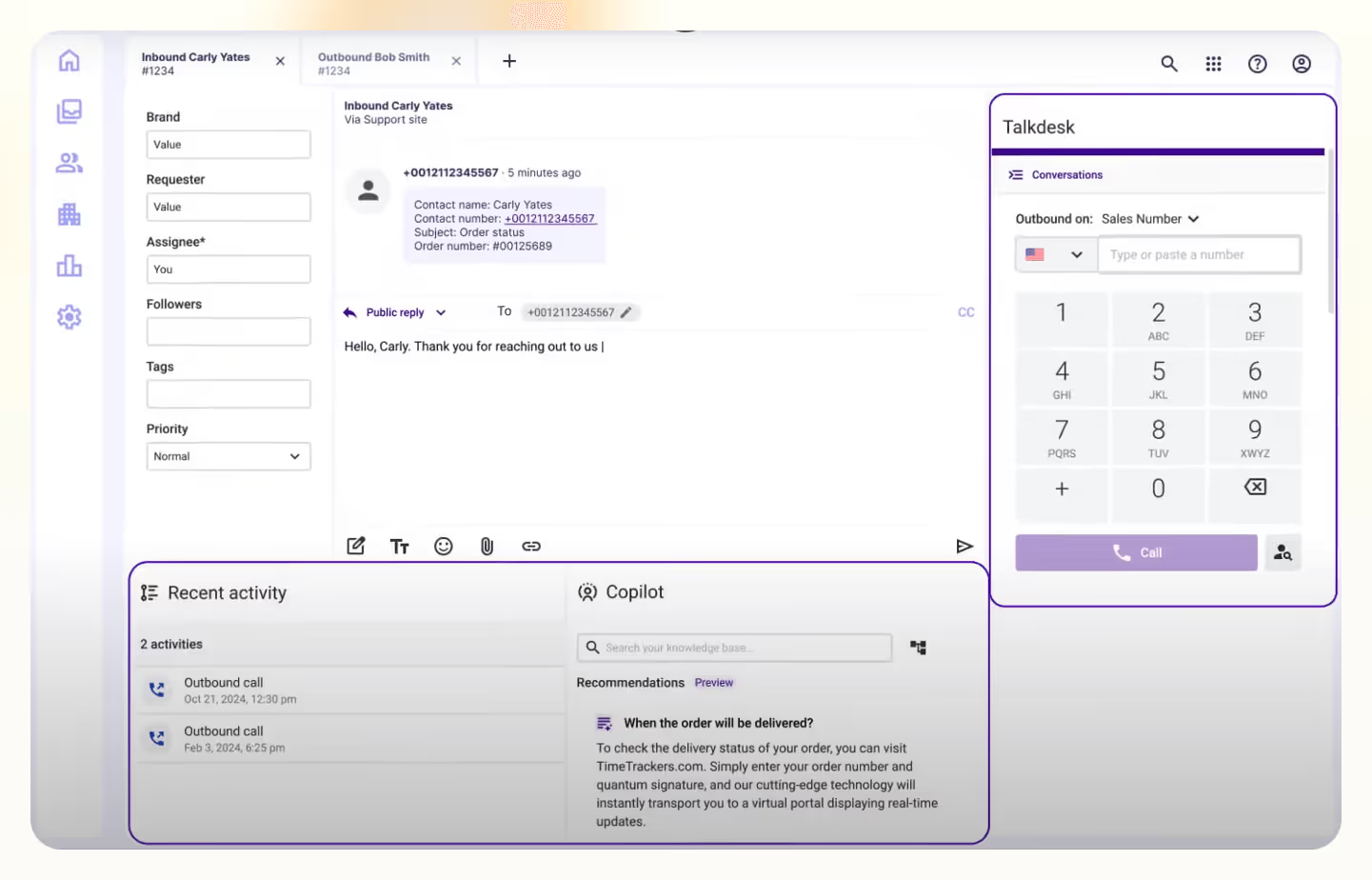
Talkdesk is a cloud-based call center platform that helps teams automate support with AI. It was easy to set up and test, even though it's built for large teams.
The AI Virtual Agent handles common inbound questions on its own, understands more complex ones using generative AI, and gives answers that feel specific to the customer. It hands off the call to a live agent when needed without losing context. For simple tasks like order lookups or delivery updates, it worked smoothly — even outside regular business hours.
I liked that you don't have to build everything from scratch. The Automation Designer has ready-to-use templates for common tasks and a drag-and-drop interface to set up rules, responses, and triggers. You can tweak the logic and integrations using simple no-code tools if you need something more custom.

While testing the Zoom + Talkdesk integration, I noticed how easily transferring calls between departments was. Each agent instantly had access to caller context like names, company info, and recent tickets — without juggling through multiple tabs.
Talkdesk Voice makes managing calls simple. Routing was smart, and calls went straight to the right agent. The quality was solid, and I could easily handle everything from desktop or mobile without any hassle. There's an intuitive workspace for agents to manage queries without any clutter.
Talkdesk does have its gaps. Some G2 users report issues like being unable to pause call recordings or place customers on hold before transfers. But what stood out was how Talkdesk support responded directly to these reviews. They acknowledged the concerns and suggested fixes. It's rare to see a tool publicly engage that quickly.
Features
- Generative AI-powered routing with Talkdesk Navigator
- Talkdesk Agent Workspace to handle calls from screen pops, click-to-call, and the app
- Integrates with popular tools like Zendesk, Slack, Salesforce, and Teams
- Talkdesk Academy and YouTube channel for guides, onboarding, and training support
- AI tools for real-time translation and rewriting content
Pricing
Talkdesk offers multiple pricing editions, but the CX Cloud plans are the most relevant for AI-powered contact centers. These plans focus on voice, automation, and workforce tools, with optional add-ons and access to a broad integration marketplace. Here are the paid plans:
- CX Cloud Digital Essentials ($85/user/month): Talkdesk Ascend AI, digital engagement (email, chat, SMS, social), API access, real-time dashboards
- CX Cloud Voice Essentials ($105/user/month): Everything in Digital Essentials, plus voice engagement, workspace designer, and automation designer
- CX Cloud Elite ($165/user/month): Everything in Voice Essentials plus custom reporting, screen recording, workforce management, and proactive outbound engagement
Ideal For
Teams in industries like tech, retail, or finance that need a scalable voice solution with AI automation baked in. It's a solid pick for support-heavy organizations that want to manage everything — routing, agent coaching, analytics — in one place.
Verdict
If you're looking for an AI-first system with strong automation and responsive support, Talkdesk is a solid option. But it's not the most plug-and-play solution — you'll need time to fine-tune it and make it fit your workflows. That's where tools like Lindy have an edge. It offers similar AI features but with a simpler setup and more flexible pricing, especially for small teams on a tight budget.
4. Five9: Best for complex enterprise call workflows
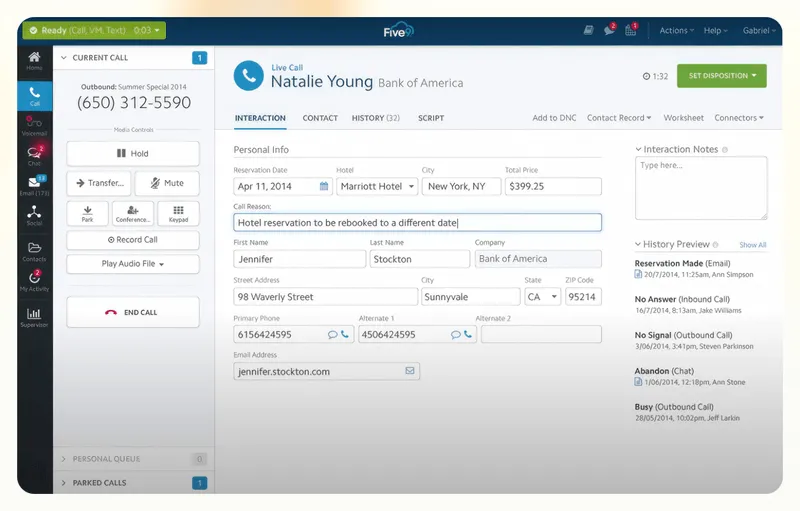
Five9 gives you a full AI toolkit to manage customer calls, support agents, and build custom workflows — all in one place. It's built for teams that want control over every part of their contact center, from call routing to agent coaching.
I tried the agent assist feature during a few test calls. It suggested answers, shared relevant help articles, and flagged follow-up steps while the call continued. It also picked up on customer tone and gave prompts to respond more calmly when someone sounded upset. These nudges weren't perfect, but they helped me stay focused.
I liked how Five9's Blended Contact Center lets agents handle both inbound and outbound calls from the same screen. There's no need to bounce between queues or tools; everything — from call routing to CRM syncing — just works together. It felt smoother than most setups I've tested, especially if your team's juggling support and outreach.

Five9's virtual agents are also useful for handling basic questions, like checking order status or updating contact info. You can launch them quickly using prebuilt templates or tweak things using their drag-and-drop workflow builder.
I also tested their AI summaries, which automatically pulled key info from the call after it ended. It saved me time and was accurate enough for quick handoffs.
Still, it’s not the easiest platform to pick up. Some G2 users mentioned slow support and a steep learning curve — and I felt that too. Even basic things like setting up routing or customizing dashboards took more steps than expected. You'll need a bit of training to get comfortable with Five9.
Features
- Quality management with coaching tools and real-time monitoring
- Workforce scheduling with skill-based routing and agent preference rules
- Custom dashboards and KPI tracking for performance oversight
- CRM-ready setup with integrations for Salesforce, Zendesk, Oracle, and ServiceNow
- Emotion and sentiment analysis across calls, chats, and emails
Pricing
Five9 offers two paid plans and three custom options. While there's a free demo available, all plans require a 36-month contract. Features like recording, analytics, and workforce management vary depending on whether you choose the Digital or Core version. Here are the paid plans and what they offer:
- Digital ($119/user/month): Chat, email, SMS/MMS, social messaging, blended inbound/outbound, geo-redundancy, interaction analytics, full workflow automation
- Core ($119/user/month): Voice, blended inbound/outbound, agent desktop, geo redundancy, call recording, dialer, enterprise WFM, full workflow automation
Ideal For
Five9 best suits enterprise teams in aviation, e-commerce, education, and banking, especially teams that need advanced routing and AI-assisted workflows. Companies like Alaska Airlines and AdventHealth use Five9 to improve their CX strategies
Verdict
Five9 gives you serious control, especially if your team needs detailed workflows and channel automation. The AI features stand out, like live agent assist and predictive analytics. But it’s not the easiest platform to set up. You'll need time, training, and a decent budget. If you want something more flexible and easier to get started with — especially for smaller teams — Lindy might be a more practical pick.
5. Genesys Cloud: Best for omnichannel AI contact centers
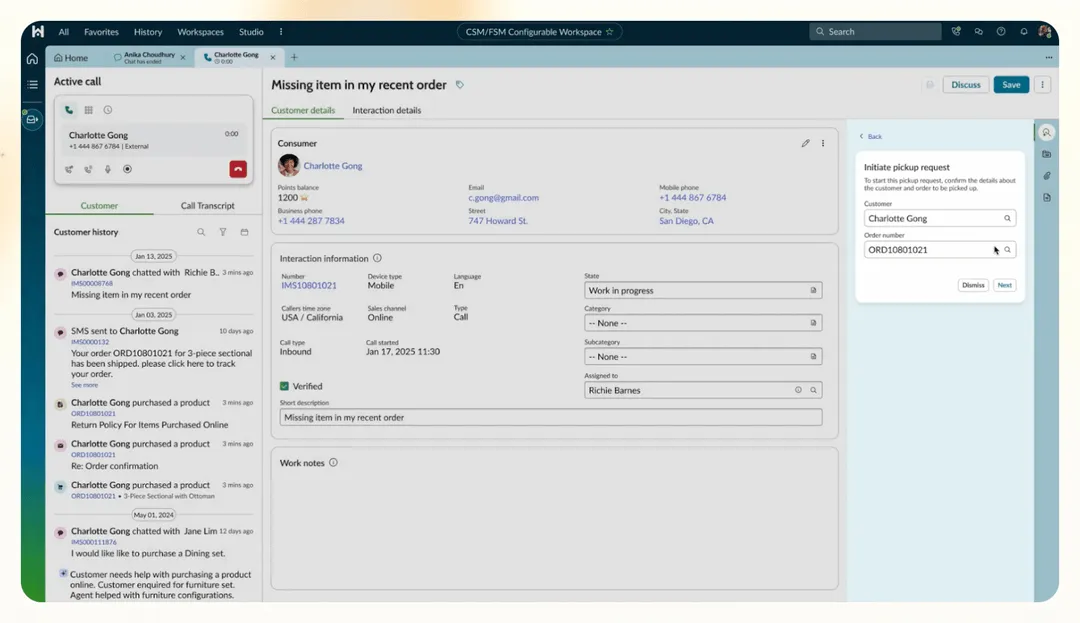
Genesys Cloud is designed for teams that want to run a smart, AI-backed contact center without stitching together multiple tools. It handles everything from automating support and guiding agents live to routing conversations with context, whether over voice, chat, or messaging.
I used the visual flow builder to set up customer journeys. Initially, the interface felt a bit clunky, but the control Genesys gave me more than made up for it. I connected it with Google DialogFlow to build a conversational bot. Even when I asked vague or half-formed questions, the natural language understanding (NLU) gave contextual replies instead of robotic ones.
The IVR experience also felt like a step up. I said, “I need help with a payment issue,” it sent me straight to billing. That mix of AI and voice recognition made self-service a fine option.
What stood out was routing. Genesys gives you options to escalate issues. You can use AI-based routing that matches customers based on past data and agent skills, or use skills-based routing to define which agents handle specific queries, like billing, sales, and tech support.

Bullseye routing starts with a small group of ideal agents if the best-matched agent isn't available. It gradually expands to include others with similar skills, so the customer gets help without long wait times. With dynamic queue management, agents can shift across roles depending on live demand.
Genesys does take some effort to set up. I had to spend time figuring out the automation and reporting tools. In such a case, Lindy has a less cluttered interface, easy-to-set automations, and quick workflows.
Features
- Drag-and-drop builder for automating agent workflows
- Visual dashboards with real-time agent performance insights
- Built-in tools for training, coaching, and feedback
- Secure platform with TLS and AES-256 encryption
- Omnichannel support across chat, email, voice, and SMS
- Agent scorecards to track quality and adherence
Pricing
Genesys Cloud has four paid plans, all billed annually. The features stack as you go up the tiers, with more AI, analytics, and workforce tools included at the higher end. Here are the paid plans and their offerings:
- CX 1 ($75/user/month): Voice channel, call routing, speech-enabled IVR, outbound campaigns, analytics and reporting, unified communications, interaction recording, knowledge base, native bots, predictive engagement, predictive routing, and Agent Copilot.
- CX 2 ($115/user/month): Adds digital channels, omnichannel routing, quality assurance, and compliance.
- CX 3 ($155/user/month): Employee performance tracking, resource management, AI-powered forecasting, and speech & text analytics.
- CX 4 ($240/user/month): Includes everything in CX 3, plus virtual agents, journey management, 30 AI Experience tokens per agent, social listening, forecasting, and supervisor tools like Virtual and Supervisor Copilot.
Ideal For
Genesys Cloud CX is best for larger teams that want control over every piece of their contact center, from routing logic to agent training. It's a solid pick for industries like telecom, banking, or travel, where support is high-stakes and multichannel.
Verdict
Genesys Cloud CX is powerful, but it’s not the easiest CX tool. The routing and agent tools work well, but the initial setup takes time. If your team can handle that, it's a strong platform. But if you want something quicker and easier, tools like Dialpad or Lindy might be a better fit, especially for smaller teams that need to move fast.
6. Zendesk AI: Best for high-volume support ticket automation
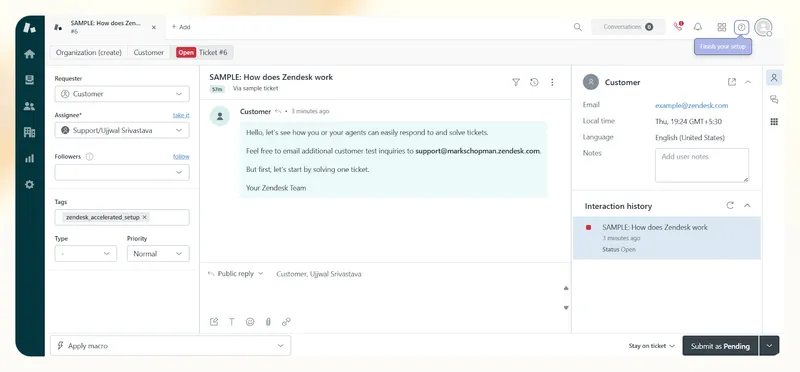
Zendesk AI helps you automate tickets, assist agents, and resolve issues without needing a live rep. I tested everything from AI agents to voice tools and after-call summaries — what stood out was how much routine work it took off my plate. Setup didn't require any code, and once I linked it to our help center, the AI could reply, summarize, and close tickets on its own.
In my tests, Zendesk's AI agents resolved complex issues — like processing returns without a receipt — by checking the backend, issuing store credit, and updating records. This happened inside the same chat window, without a live agent jumping in. The replies were quick, contextual, and in a conversational tone.
I could route calls based on queue load, take them over VoIP or PSTN, and set up callbacks, so customers didn't have to wait. Then the AI logged the full transcript and summarized it into bullet points using ChatGPT, which cut my after-call work too.
I also tried Zendesk's Spotlight QA tool. It flagged calls missing compliance disclosures or where the AI agent seemed stuck in a loop. The dashboard didn't just help me review conversations but also easily leave feedback and assign coaching tasks based on trends.

When I typed in a basic query like “how to open an account,” Zendesk’s Generative Search pulled top articles from the knowledge base and used OpenAI to give a human-like response. You can connect it to external sources through federated search, so it doesn’t rely on internal docs.
On the downside, advanced features like Agent Copilot, Workforce Management, and AI-powered forecasting are available as add-ons. Each runs $25–$50 per agent/month, which can stack up fast for small teams. If you're on a tight budget, a more flexible and all-in-one tool like Lindy might make much more sense.
Features
- Zendesk lets you localize your help center in over 40 languages
- Voicemails automatically create tickets for easy tracking and follow-up
- AI-powered content cues to create relevant help center articles
- Zendesk Marketplace for over 1,000 prebuilt apps and integrations
- Customized agent roles, audit logs, and approval workflows
Pricing
Zendesk offers three paid plans under its Customer Service Suite and a free trial to explore the basics before committing. Here’s everything that you get with their paid plans:
- Support Team ($25/user/month): A basic ticketing system with email, contact forms, a unified agent workspace, and simple automation triggers. Good for teams needing email-based support.
- Suite Team ($69/user/month): Adds multichannel support, AI agents, live chat, messaging on platforms like WhatsApp and Slack, proactive messaging, and a customer knowledge base.
- Suite Professional ($149/user/month): Brings in skills-based routing, SLAs, custom analytics, satisfaction surveys, multiple ticket forms, and a customer self-service portal.
Ideal For
Zendesk is best for mid-to large-sized teams with multichannel support and high ticket volumes. It suits businesses with a help center in place that need AI to automate and scale without adding headcount.
Verdict
Zendesk offers strong capabilities, particularly for teams managing high volumes across multiple channels. I liked how easily it handled routine work and flagged edge cases without needing a live agent. It's important to note that the pricing can increase significantly with added features. If you're a smaller team or just want smart AI without the extra fees, I'd go with something leaner like Lindy or Dialpad.
7. Invoca: Best for call analytics and marketing attribution
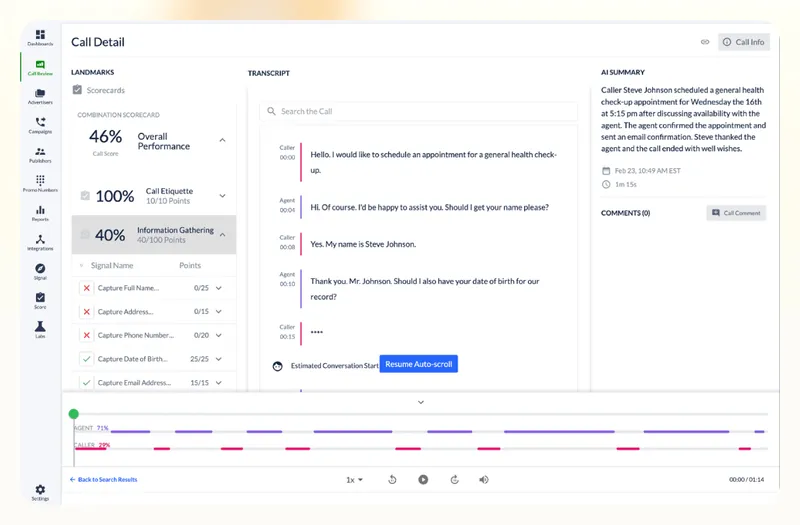
Invoca is more like a smart assistant that helps you with phone conversations. I tested it with a focus on sales and support calls, and what stood out most was how quickly it identified which conversations needed attention and why.
At its core, Invoca listens to every call, transcribes it, and scores the interaction based on criteria you define — like whether the agent stuck to the script or mentioned key promos. But it does more than just solve basic queries. Invoca uses AI to flag calls that went well (or didn't), so your team isn’t stuck reviewing everything manually.
One thing I liked was the automated agent identification. It uses voice recognition to figure out who handled which call, which makes it easier to track performance and pull up agent-specific reports.
If you run campaigns across Google Ads, Facebook, or search, Invoca tells you which drives high-quality calls, not just leads. It connects the dots between the ad click, the call, and what was said, then pushes that data back into your ad platforms. I could see which campaigns generated revenue, not just vanity metrics.
A dashboard shows caller sentiment and agent performance and alerts you when something goes off track. It's built for marketers and sales teams who want to stop guessing and start acting on what customers say.
Invoca also integrates with over 100 tools, including CRMs like Salesforce, analytics platforms like Google Analytics, and ad platforms like Google Ads and Meta. I connected it to an ad account and CRM, and it instantly synced call data.

Features
- Automatically detects unanswered calls, voicemails, and agents with VoiceID tech
- Real-time dashboards and smart alerts for managers
- SAML single sign-on user authentication
- Signal AI conversation analytics suite
- Dynamic call routing, including real-time webhooks
- Custom IVRs to personalize inbound call flows
Pricing
Invoca doesn't share upfront pricing, so you must book a demo for all plans. That makes it hard to gauge costs upfront, especially for budget-conscious teams. Still, it offers three clear tiers with increasing usage limits and advanced features:
- Pro: Includes 6,000 annual local or toll-free numbers and 5 custom Signals. You can track inbound calls, build custom IVRs, and connect offline conversions using no-code integrations and APIs.
- Enterprise: Adds enhanced digital data capture, ad integrations, advanced IVR tools, and single sign-on for more robust analytics and access control.
- Elite: It includes PreSense, intelligent call routing, SIP support, affiliate marketing tools, and integrations like Adobe Experience Cloud.
Ideal For
Invoca is great for marketing and CX teams in automotive, telecom, insurance, and retail industries — especially those managing multi-location campaigns. If inbound calls play a key role in your conversions, Invoca helps you track, analyze, and improve them in real time.
Verdict
Invoca is like having a call analyst who understands what's happening in those conversations. I loved how easily it flagged issues and linked calls to ad campaigns. But without transparent pricing, it's hard to know if it's worth it unless you're running high-volume, revenue-driving calls.
8. Cognigy: Best for goal-driven virtual agents with memory
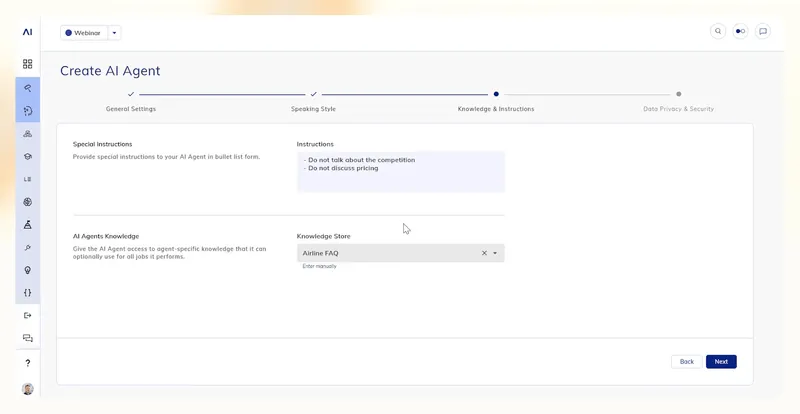
Cognigy helps you build a team of virtual agents that can talk, think, act, and even remember your customers. I spent time exploring its new Agentic AI platform, and it was one of the few tools that felt like a leap forward, not just another rebrand of a chatbot builder.
You can train agents with their personalities, voices (even cloned from ElevenLabs or Deepgram), and specific job roles. I built an agent called Lisa in under 10 minutes, gave her airline knowledge, a friendly tone, and even taught her how to check customers in for flights.

Lisa remembered my name across chats, understood context like a real person, and handed me off to billing or support agents when needed.
What makes Cognigy's AI agents different is the way they reason. If a customer says, "My flight’s tomorrow, and I need vegetarian food," the agent doesn't just spit out a help article. It breaks the solutions into actionable steps — verifying the flight, storing the preference, and triggering backend actions like sending an email or updating a profile.
These agents can escalate to humans or call other agents for specialized tasks like a real contact center. Everything's tracked in real-time, and short-term and long-term memory is used smartly to keep interactions fluid and contextual.
Cognigy’s also built for enterprises. You get a no-code interface, security layers, vector-based knowledge ingestion, and support for 100+ integrations (including options from OpenAI, Anthropic, Google, AWS, and others).
Features
- Multi-agent orchestration with agent handoffs
- Real-time voice and chat support with custom avatars and voices
- Fully integrated knowledge ingestion (PDFs, APIs, websites, etc.)
- Vector store-backed search for accurate responses
- Guardrails for security, including jailbreak prevention and content safety
- Configurable voice using Speech Synthesis Markup Language (SSML)
Pricing
Cognigy doesn't list standard pricing plans. To get a quote, you'll need to speak with their team and schedule a demo.
Ideal For
Cognigy is a solid pick for public services, utilities, and manufacturing teams that need consistent support at scale, especially if your agents juggle complex backend systems. It's also a great fit for tech companies building multilingual, omnichannel support experiences across chat, voice, and web.
Verdict
Using Cognigy feels like working with a smart, scalable support team. The AI agents are goal-driven, context-aware, and surprisingly human in how they respond and take action. But if you're looking for a more well-rounded contact center AI with a simpler setup and transparent pricing, Lindy might be the better bet.
The future of call center AI
Call centers are changing fast, and AI is leading the shift. But we're not talking about simple bots anymore. We're talking about full-on AI teammates who can talk, think, and act like real people (or sometimes better). Here’s what to expect in the future with call centers using AI:
- Autonomous agents are getting smarter: We're moving from static flows to AI agents that work independently. These agents don't just answer questions — they complete goals. They can collect documents, update CRMs, book appointments, and follow up without anyone babysitting.
- Voice and chat are converging: The days of handling phone and chat support separately are fading. The future is hybrid — one AI agent that moves smoothly between voice and text, depending on the customer's preference — no more juggling platforms.
- AI supervisors are here: Instead of managers tracking every call manually, AI now flags issues in real time. These AI supervisors can monitor tone, check if agents follow scripts, and even coach reps during calls. Forbes notes that AI is already "improving agent performance" this way.
- Proactive support is the new standard: AI isn't just reactive anymore. It can spot patterns, predict churn, and reach out before the customer complains. Think reminders, check-ins, or order updates — sent automatically, based on real behavior.
- Humans + AI will be the default team: This isn't a full replacement. AI will handle the repetitive stuff; humans will step in when it's complex or emotional. As Forbes also states, AI will "free up human agents to focus on higher-value work."
But when comparing call center AI solutions, think beyond bots — look at full workflows, memory, and collaboration tools.
How does Lindy fit in?
Lindy is already pushing toward this future. With Agent Swarms, job-based memory, voice+chat agents, and no-code workflows, it's not just keeping up — it's helping shape what AI-powered support should look like. Lindy lets teams do more with less, from outbound sales to post-call summaries.
How Lindy powers AI-first call centers
Lindy's voice agents are designed to autonomously handle both inbound and outbound calls. For inbound calls, Lindy can greet callers, understand their queries, access your knowledge base to provide accurate answers, and document the interaction — all without manual tweaks.
Lindy can initiate contact with leads, engage in natural conversations, schedule consultations, and update your team on call outcomes for outbound calls. Setting up these Lindies is quick, often taking just a few minutes, and they can be customized to align with your company's voice and procedures.
Supports email, chat, and calls
Whether it’s emails piling up or chats that need quick replies, Lindy can jump in, read the context, and respond like a human would (only faster). It pulls the right info from your knowledge base and keeps the tone friendly, helpful, and on-brand.
Easily trains on custom data and SOPs
You don't have to start from scratch. Just upload your FAQs, internal docs, or any how-to playbooks; Lindy will learn them in minutes. It uses your existing content to give answers, follow steps, and act the way your team already works. No complicated setup. No endless tweaking.
Offers AI agents (collaborative task handling)
Here's where Lindy gets fun: it doesn't work alone. Multiple Lindies can jump in and divide the workload. So, while talking to a customer, another might pull up the order history or draft a follow-up email in the background. It's like having extra hands during crunch time — without hiring anyone.
FAQs
Can AI completely replace agents?
Not really. AI is great at handling repetitive or high-volume queries, but human agents are still needed for emotional, nuanced, or sensitive situations. The future is hybrid — AI handles the grunt work, agents step in when it matters.
How does AI improve customer satisfaction?
By being fast, consistent, and always on. AI doesn't need breaks or get frustrated, and when done right, it remembers past conversations, personalizes replies, and resolves issues before they escalate.
What's the difference between AI and automation?
Automation follows rules — think "if this, then that." Meanwhile, AI adapts to what users say, understands intent, and can make decisions in real-time without needing step-by-step instructions. Tools like Lindy handle both pretty well.
Can AI understand emotions or intent?
Modern AI can detect tone, intent, and even mid-call frustration. It might not "feel" emotions, but it can respond like it does, which helps keep customers calm and conversations on track.
Is it hard to implement AI in legacy systems?
It depends on the platform. Older tools need more setup, but systems like Lindy integrate with legacy CRMs and backend systems using no-code workflows, APIs, or platforms like Pipedream.
How secure is AI for handling customer data?
Most AI tools share privacy policies, but choosing platforms with encryption, access controls, and strict data handling rules is safer. Ensure they follow standards like SOC 2 or GDPR before trusting them with customer data.
What makes Lindy different from other platforms?
Most AI tools just answer calls or route tickets. Lindy builds full workflows: it remembers past interactions, understands context, breaks tasks down, and loops in the right apps or people. With 3,000+ integrations and multi-agent orchestration, it's more like a high-performing teammate than a chatbot.
{{cta}}
Try Lindy: Your new AI call center agent — and so much more
Lindy isn’t just answering calls — it can manage your entire contact center workflow with precision. From triaging support requests and syncing with CRMs to qualifying leads and generating post-call summaries, Lindy acts like a full-time teammate, not just a chatbot.
Here’s how Lindy upgrades your call center experience:
- Built-in call handling: Automatically answers, routes, and resolves inbound and outbound calls based on intent and urgency.
- Auto-summarize every call: Generates detailed post-call summaries and syncs them with Notion, Google Docs, or your CRM.
- Instant context recall: Pulls customer history, previous tickets, and key account data — while the call is still happening.
- Fully multilingual: Supports 30+ languages for global-scale support and outreach.
- Works with your stack: Integrates seamlessly with HubSpot, Salesforce, and thousands of others.
- No agent burnout: Operates 24/7, handles spikes in call volume, and distributes work across multiple Lindies in parallel.
- Much more than just an AI call agent: There’s a huge variety of Lindy functions, from content creation to coding. Check out the full Lindy features list.
Are you ready to build an AI-first contact center that sounds human and runs like a machine?



.png)
.png)
.png)
.png)
.png)
.png)


